Ongoing Projects
These are things I like to work on in my spare time. Often I'm some distance away from coding, but I find it relaxing to do (kinda). The downside is the nit-picking detail that often seems to be pointlessly required. Indeed one untouched application of AI might well be filling in the 'obvious' stuff, like semicolons where required - often when there is no ambiguity about intent.
Also, it's hard to write anything that will really last. Microsoft, for instance, constantly seems to be changing it's UI toolset(s), language aspects or focus, Visual Studio menu item locations, and other such things. It would be as if your local hardware store periodically changed the threading on all of the bolts they sell, so you either end up with hybrid constructions, or have to replace fine older bolts with the (sometimes inferior) 'new' ones.
Some of these projects might turn into somewhat quaint sold products, but more often I may just put the software explicitly in the public domain (or some sort of other public license). It's one reason I have this page - if someone stumbles upon it, and wants some or all of a project, just get in touch.
Typically these projects (at least the software ones) are done using the free 'community' Microsoft Visual Studio tool, and written in Visual Basic (VB.NET). For those that like, say, MS's C#, there are websites out there that will translate VB to C# automatically. I've stuck with VB mainly due to inertia, but it's also simple enough to be readable, and has most of what modern languages should have - object-oriented programming for instance. Though I really miss Lisp's macros - the ability to create decent custom language structures.
Image Transformations, Both Digital and Analog
This was a project I did to present historical information, mainly to kids - to give them full context. The idea is to overlap an historical photo with a current one the kids would recognize - here's the old Quiambaug schoolhouse, no a private home - my first attempt at doing this (give it a few seconds to fade in and out - repeating):
![[Loading...]](./ideas/real1.jpg)
![[Loading...]](./ideas/ghost1.jpg)
The tool does ask the user the general type of transformation to use - it might be simple scaling, shifting, and rotation, or skewing, or other sorts. In general one may say that a planar surface in one image may pretty simply be matched to a planar surface in another, but for some images, this gets complicated - imagine standing close to a corner of your house and taking a photo that shows both walls, and maybe some roof. The transformations for the planar sections may be a bit different. In my tool (at least so far) I make a "far field" assumption that everything pretty much transforms the same way.
To compute the transformation, one has to solve a set of equations; this set may be expressed as a matrix equation, where the "new" position (matching the current image) may be computed from any given pixel in the "old" image. Such a system of equations may be solved by inverting to coefficient matrix. I didn't want to do this every time I processed an image, so I put in symbolic parameters for the values (e.g., (X1_new, Y2_new), (X1_old, Y1_old), for as many points as were specified), and I used the symbolic tool Macsyma to do the matrix inversion. (This can not work for 'degenerate' cases with weird inputs, but in that case I'd just throw an error). The result was a closed-form solution in terms of those symbols that would tell me where any pixel in the old image should fall in the new image. I use that to create the old part of the 'fading' process. As you can see, it works digitally.
I also thought of an analog version - maybe this should be in the 'ideas' section, though it might be fun to build now. It would be a box, mounted in a fixed location, looking in a fixed direction. Binocular-like eye pieces would to some extent guarantee that the user looked just one way.
Normally, the user would just see the modern scene through the box. However, at a 45 degree angle, would be a half-silvered mirror - not visible if just looking through the box. Below that, aligned with the modern image, would be the historical image. This would not normally be seen; but if the user turned a knob, it would be lit up, and if fully illuminated the user would see only the historical image. So the user could go back and forth, from old to new, at his heart's content, examinine details.
I think this might be useful at a variety of historical sites - battlefields, cathedral ruins, modified houses, etc. I haven't built it for lack of time mainly; and there are practical issues, as the height also needs to be fixed (though that could be compensated for nearly perfectly if the box rotated up a little if it were lowered, and down a little if it were raised).
Here's a very crude sketch - it's awful, but the kind of thing I'd toss into a notebook - the person would look in at the left side, and could either see the current stick figure, of, if the image on the bottom were strongly illuminated, the person would see the historical image on the bottom of the box. Which took precedence would be controlled by an illumination knob, so the user could see what's currently present only, historical image only, or anything in between. This whole box would be on a post, likely with some descriptive text attached:
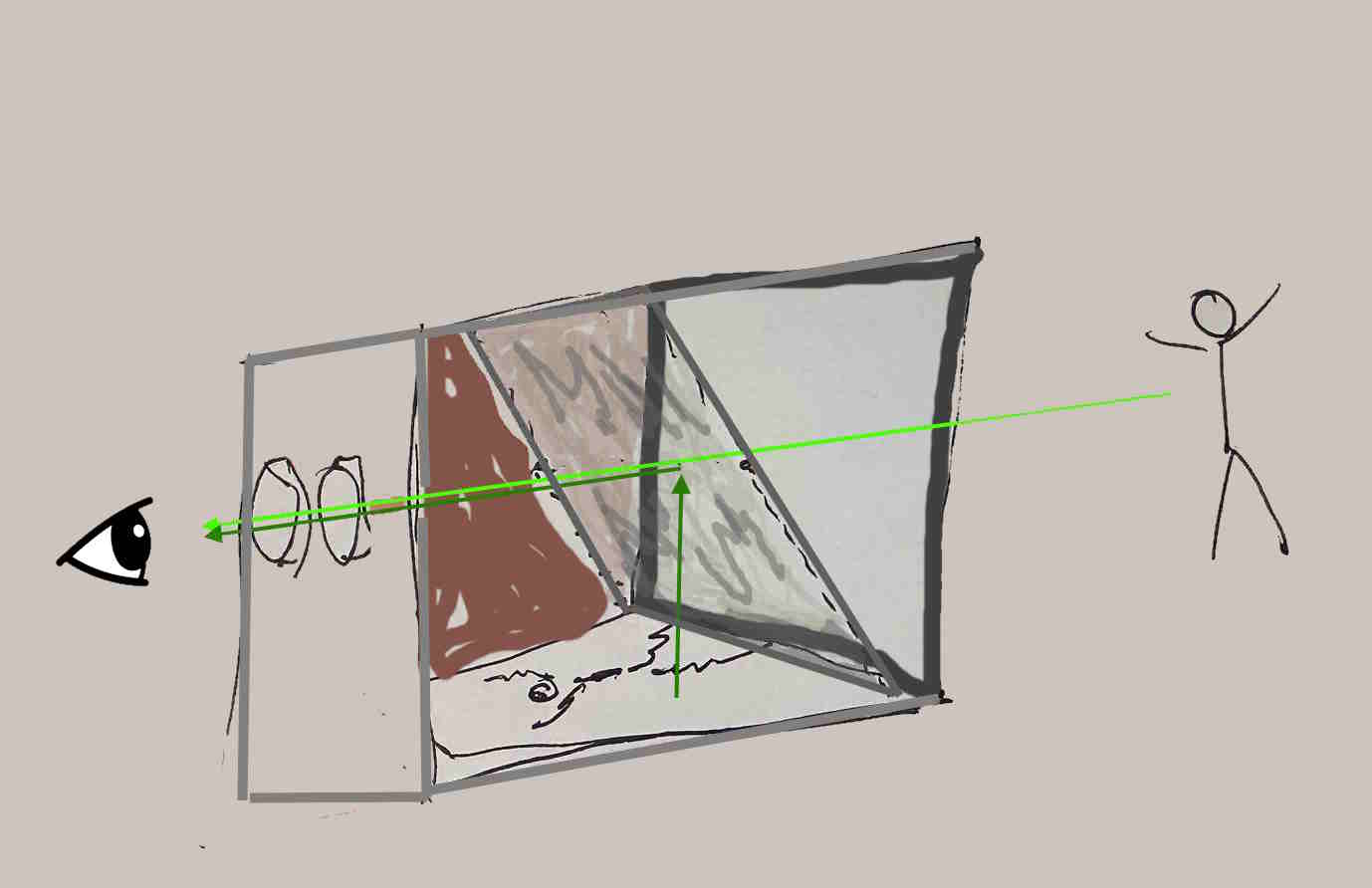
That's a pretty awful sketch - it's a box, with the side nearest you removed. You can see the half-silvered mirror at 45 degrees in the box, the historical image in red at the bottom of the box. The back side is in brown; the lights aren't shown, nor the knob to control how strong the light should be.
A few years back a wrote a mini-proposal for yet another digital form of this. Here's how it would work - let's say you're walking down a block in Manhattan, and you've turned this app on. There's a "ding" - it means that, given you're location, you're virtually in the spot an historic photo was taken, that is stored in a database with public access. You pause; the app may give you a compass direction.
You aim your iPhone (or whatever) that way, move it up and down a little, and left and right. The app has extracted key "primal sketch" info from the historic photo - building edges, road intersections, basically the minimum needed to do a match. As you're already aiming at roughly the right space, after not a lot of back and forth the app would provide little arrows to fine-tune your aim, and, when it's right, the historic image would appear, overlapping the current real view you have. You might see individuals or carriages coming down the road, people entering or exiting buildings - it would psychologically be a kind of time-machine, letting you look back to a previous era.
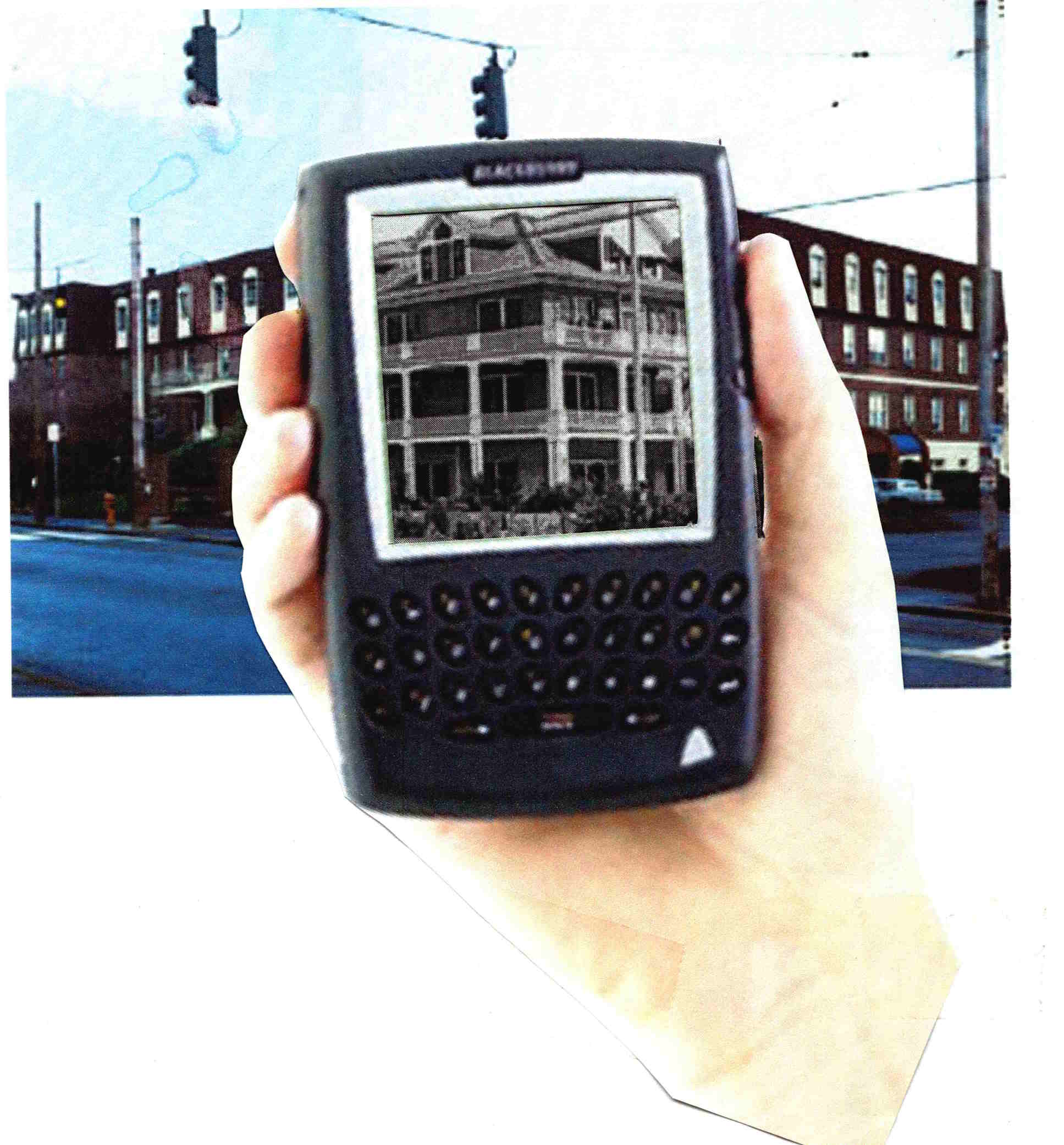
In effect, your phone becomes like the analog device described above. Perhaps there is just no need for the analog device - one might imagine markers in the pavement with little arrows: stand there and the above process becomes much simpler.
More Complete Screensaver
I have a large number of photos, and for each there is a location, and there are individuals in the photo whom I'd like to identify. Now some tools, I think Google is one, will track a lot for you, and come up with collections like "Your trip to Paris". But they keep that metadata, and if you wish to move on with just your imagery, you'll lose those capabilities. The best thing is to insert the key information into the EXIF data in each image (a bit more on that further on).
I like a screensaver that shows me (at least for now) random imagery, and provides the extra information. Here is a screenshot from the tool (though it's changed a bit - I frequently use it, then do rounds of improvements):
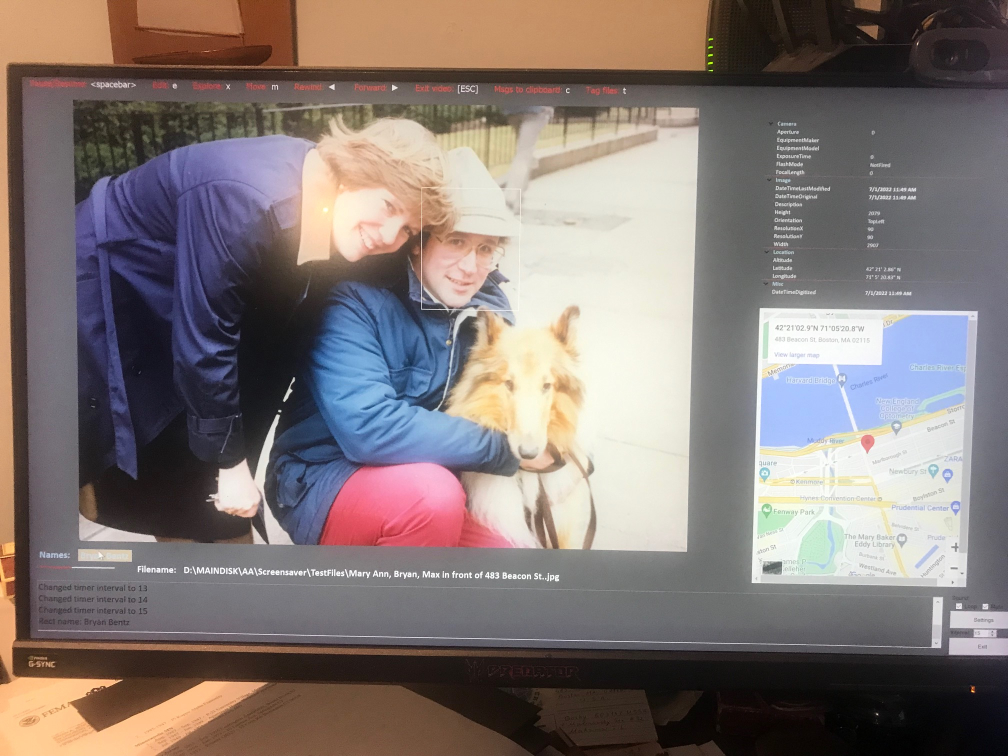
If you look closely, below the photo, highlighted in a kind of tan and not very readable, is my name, just to the right of the text that says "Names:". When I moved the mouse over it, a rectangle appeared over my face (between my wife and my dog). Often there are many people in any given photo, and they each get a rectangle spaced out horizontally. By moving the mouse one may see the faces in the video (right now at least it doesn't work the other way, you can't move the mouse over a face and see the name, but that's fairly trivial to do). To the right of the photo is a map - if I have the lat/lon in the EXIF data I toss up a google map of the area, in this case outside our old condo at 483 Beacon St. in Boston. Above the map is the detailed EXIF data (at least some of it), identifying the camera type, the focal length, etc.
Across the top is a set of commands: if one hits SPACEBAR, the screensaver pauses. One may "tag" the photo for later work (if it needs editing or something), and the full path is saved to a desktop file. Other entries allow one to skip forwards or back, or "explore" the directory it is in. Under the photo is the full filename - and at the lower right are buttons to change settings such as how fast it runs, what directories it uses, etc.
Right now I run this as a 'normal program', so I may move the mouse and such without exiting it as a screensaver. When I'm done with development I may revert it to a screensaver, or use a publicly-available tool that lets any program run when a screensaver would start. There's an exit button at the lower right corner
I've found this very useful to run - sometimes I'll see a photo of, say, one of my daughters, and it's nice, but the map reminds me that it was at a restaurant in Ireland, in Dublin, and I remember the evening. I also have a large collection of genealogy/family photos, which I'm tagging as well as I can for future generations. Unlike the google world, all of this information is written into the file, so if I email it to someone, or move it to another disk, it's still there.
My default MS Windows "slideshow" handles .jpg's, etc., but not HEIC's (which iPhone's capture), .pdf's, any movie formats, etc. This system handles all of those. Some older cameras, notably the Canon Powershot A40 (iirc), optionally captures a bit of sound when it takes photos. I've written this tool to play that while the photo is shown (if the user wants it - sound popping up can be a bit disturbing it not expected).
Now, the location data for new photos is pretty trivial as my iPhone (and I presume most other modern phones) add the lat/lon to the EXIF data automatically. For older photos, I use a tool called GeoTagger - I'm not specifically endorsing that, there may be others out there, depending on the platform you use - but it lets me add location information to images. This isn't that hard as you might think - I did it a little bit at a time, for instance, going through various places in Greece, making sure I recalled correctly, checking the photos before and after, glancing at maps. It wasn't a bad way to relax for 15 min/day, and it all got done.
For faces, I use TagThatPhoto (again, likely one of a large family of applications) that finds faces in photos, groups them, and lets me name them (I can toss ones out of their 'suggestions' trivially). Once I've identified an individual, that appears as a suggested name in other photos, so further ID's become progressively easier. This has helped enormously.
Right now, I use this program actively, and I'm trying to replicate the iPhone's 'active photos' (or whatever they call it) - if I look at a photo on my iPhone, I'll see a very short video clip around the time of the photo (leading up to it), then see the still image. It does add a little life to things. The iPhone provides this data as the still image and a .MOV very short video clip. I'm trying to align my photo display precisely with my video display, show the video, set that part of the screen to be 'transparent', leaving the static photo. It's close; maybe it's just a matter of default borders that need to be compensated for or something. (I also saw some mention that MS provides a means for this display, which I may be able to directly incorporate - I haven't had a chance to eval that yet.)
Unit Types
Programming languages have "types" for variables, e.g., integers, floating point numbers, strings, pointers, etc.
This is a 'class' library to add new types, in order to better represent physical quantities: types like "feet", "meters", "seconds", "light years", etc. If the dimensionality is right, units of the same underlying physical metric (say, length) may be added - so "30 ft" and "12 meters" and such may be added.
The declarations are pretty much as regular types -
dim FootBall_Length as yardsand so forth.
dim Float_size as meters
dim FloatTime as seconds
The basic unit types relate to the known fundamental forces of the universe (gravity, electromagnetism, the nuclear forces, time). Others are 'derived types': speed, for instance, is distance/time. "Velocity" may be a declarable type, but of course it can't be added to plain distances, or simple times (though it may be multiplied or divided by them, for instance "acceleration" is distance/time*time.) This gets complicated when it comes to something like temperature, which really isn't a basic unit - but is often used so in computations. (More on this further on).
To keep the dimensionality issues tractable, I use prime numbers for each basic dimension (e.g., 3 for time, 5 for distance, 7 for charge, etc). Then, for composite types, I compute the prime factors of the numerator, the prime factors of the denominator, cancel out any that are the same in both sets, and the reduced form is the basic dimensionality of the unit. This allows me to rapidly decide if units may be added, for example - for to do that the dimensionalities must match, even if the unit types are different.
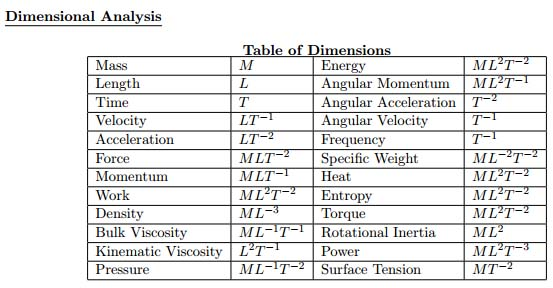
In the diagram below some of the kinds of measurements and their associated dimensions are shown: M for mass, L for length, T for time. The negative exponents mean "divide by", so velocity, distance/time, is shown as LT-1.
One straightforward issue in building a system like this is "unit systems", e.g, Metric, or Imperial, English - even "Natural Units" in which certain physical constants (c being a common choice) have the value 1. Each system has its own internal set of definitions: 12 inches per foot for example. SI units, CGS, etc. are all a little different. If the mathematics in formulae in a program are all in one system, that's fine (but then one wouldn't even need this software). For mixed units (say feet, meters) one question is: what is the desired final unit system in which to express the result(s)? It's up the the human writing the code to declare this.
One way to proceed with the architecture is to convert everything to, say, SI metric units, do the math there, then convert back. But if the programmer is adding some number of feet to some number of inches, and wants the answer in inches, there's no point to bringing in the inevitable round-off errors that result from those conversions.
The rule is do to as few conversions as possible. If there are 5 English units and one metric, maybe it makes sense to convert everything to English units to minimize roundoff; but this isn't always true, if, for instance, that metric value is cubed and multiplies the other values; in that case the roundoff error may be catastrophic. The better choice in this case would be to do the computations as far as possible in English units, and do the conversion (to or from) metric only with that one metric value when needed.
There are also different ways to express the same dimensional combinations - this is especially true for quantities that are derived units (such as Newtons: mass * distance / time * time). when multiplying these, there are a number of dimensions in the numerator, a number of them in the denominator - before canceling out ones in common, it may be necessary to "regroup" them into other derived units with different names. It's a combinatoric problem, as with n items in the numerator and m in the denominator, there are n * m single 1/1 possible units; if one mixes in the compound entries in both the numerator and denominator the count increases dramatically (no reason to get into the combinatorics, for large numbers of entries most of the combinations make no sense at all).
Obviously, the programmer's intent here must be clearly stated - what the system the desired result is in, how intermediate complex units should be presented (for debugging purposes) and so on.
Complicating this all is the fact that a number of professions use somewhat odd units - if you're working molecular physics with, say, Angstroms, you don't really want your calculations done in meters. Some other examples: one "barn", 10 to the -28 sq. meters, is the cross-sectional area of a uranium nucleus. "Shots", as in Bourbon, are another unit (1.5 oz I think). A "butt" equals 108 imperial gallons; "wiffles" are used by some biologists. There are a number of mainly humorous units, but there are sets of units used by professionals in specific fields (ones that may operate with a fairly narrow scale of some, possibly dimensionally-complex, unit) that have unusual names. And there may be equivalents of these in very different unit systems.
All of these should at least be 'representable', ideally somewhat easily. The basic units systems need to be present, but these other, rather odd derived units, should also be declarable.
I paused this project in part because, while many/most/all of the above had been worked out, I ran into a 'series of computations' issue: if there is a sequence of computations to be made to convert one (expecially compound/derived) unit to another, the round-off error may be different based on the order in which the computations and conversions are done. That I'd like to do optimally. I think it's a solvable problem, I just got on to other things before doing that.
Ambiguities
If you dug further, the ground seems to shift a bit. Given mass/energy equivalence (relativity), though mass is tied to one of the fundamental forces, gravity, small masses are often described in electron-volts, a unit of energy. One could of course (in theory, unlikely to be practical) describe energy in terms of mass. If one tries to take a 'clean', 'sound', 'theoretical' basis for units, this sort of issue pops up, and leads to very very different representations for what may be the same physical quantity. It can be a bit mind-bending, and in terms or practicality largely useless.
For now, I've found it useful to work 'in the middle', with the mindset of an engineer, physicist, or other professional working with the common units of their trades, which are often in a fairly narrow range of (size) scales. That, after all, is likely whom a programmer will likely be working for. At the more detailed, theoretical levels, there can be ambiguities - not inaccuracies, really, just unit types that don't represent anything very applicable (as representing energy as mass likely is). At the higher level, things should just fall out, but the round-off error issue may then rear its head.
Working with Uncertain Values
A related, but independent, set of projects I've been working on deals with representing and computing "uncertain" values - an example being the typical measurement of the sort "329 plus or minus 3". In programs, these values may represent data with Gaussian distribution, or any of a number of common distributions (even a uniform uncertainty between two values). The problem with this is that, for some mathematical operations, the results are not standard distributions in any respect, and may not have closed-form representations.
For those hard cases, one may represent the variable's value by a set of somewhat arbitrary (but specifiable) size of numeric samples that fit the distribution - in effect, a Monte-Carlo result as a large sample set. It's not perfect, but it allows arithmetic operations on odd distributions to be computed, though that's not trivial, and the result may not be as accurate as one might want - it becomes kind of a cross-product operation, which may be sensitive to a mix of very large and very small values.
For the typical measurement with a plus-or-minus window, those are easily handled through addition, multiplication, etc., by working with the measurement numbers, then computing the new (worst-case) plus-or-minus results. That is accurate, but without something like a Gaussian model, can expand to be less than useful.
Voter Database Workbench
Being in politics, every 2 to 4 years I come back to this tool - it's built primarily on Microsoft Access. It's purpose is to manage voter data for various campaign or informational reasons.
The basic data is publicly available from the registrar of voters, and includes CT voter ID, name, address, voting history, party affiliation, and so forth. I also bring in public data from the Assessor's office about properties owned, and other public information about political donations people have made.
In-between elections, I have a protected online database, and a little tool that lets me look someone up. When I was chairman of the party, I'd meet someone who (if politics even came up) might express some interest. By entering a name fragment on my phone I'd find all matches (in this town, that might be 3 or 4, so it was clear which was my conversationalist), and I could see which party they belonged to, how often and which type of elections they voted in (e.g., municipal, budget referenda, state/federal), and how often. The address and assessment would give me an idea of their economic status and likely neighbors, and their donation history would tell me about their intensity of involvement.
Not from my system, but an example of just some of the information available for candidates or campaigns:
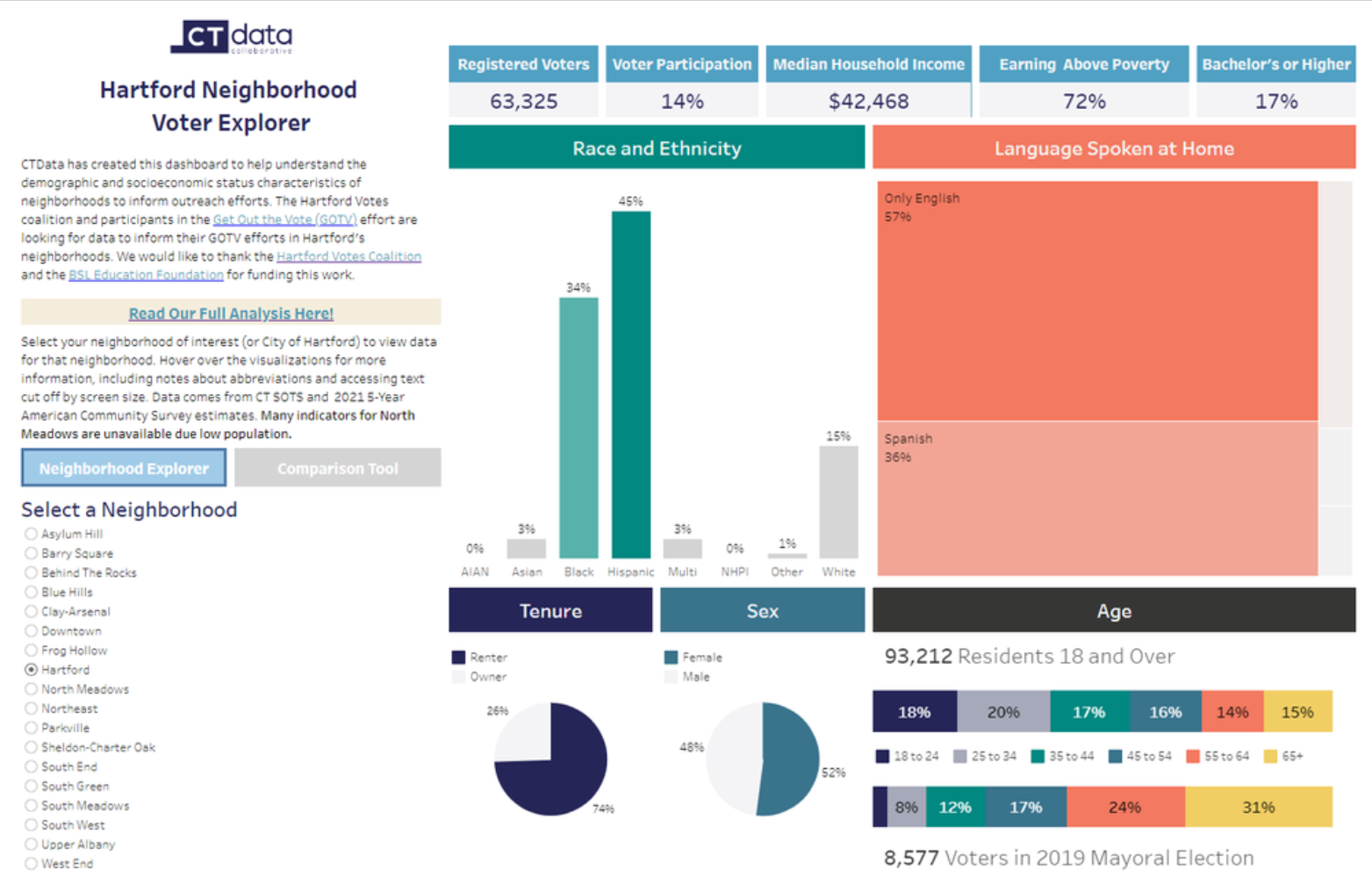
During election season, the voting frequency and party affiliation could be used to filter people who should receive 'door knocking' visits, or mailings. For direct visits, the addresses (often I'd run a lat/lon tagger on the addresses, so these were easily mapped - they could also be mapped via Google Maps if I moved a small set to a Google doc) were clear, and one might easily notice 'clusters' of voters well worth a visit. These 'walk lists' are kind of key.
The same is true of mailings. With (always) limited funds, it's important to target the likely 'swing' voters that you need to reach. There of course may be tiers of these, which receive different types of mailers, depending on inclination to vote, and the other political factors.
I designed the architecture to fit other Connecticut towns, though things are changing - CT is coming up with a new database for registrar's data, so my import tools will likely be rewritten. I don't know if I'll need it again, but others might.
MosaicSoft
I have an interest in creating stone mosaics. I thought of writing software to help (of course), but it's not as simple as one might think. Look at the face mosaic below, and notice how the stone sequences 'flow' to give shape to the face:
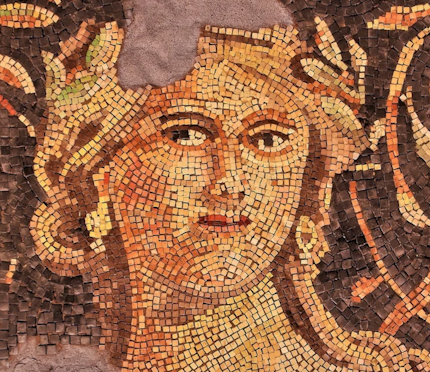
So a program or automated system that just does this with "large pixels" of stone, regularly spaced, won't be quite right - though I have seen stone mosaics with tiny tessera (Borghese Gallery, Rome) that are so fine you'd swear you're looking at a painting). Though they were so fine I can't recall if they were following contours or pixel-like. They were framed, on the wall, as if they were paintings.
If a program created the entire layout, there wouldn't be much art to it anyway - it'd be a stone version of "paint by numbers". But there's one thing software can do, which I realized when embarking on my first project - I needed to know how much stone to order.
I have a few vendors' "stone palettes". I scanned them, and for each little tessera, it computed the average RGB color (and, iirc, a kind of gaussian distribution from that average). Now, when I began or even think of a project, I take the image, load it into the tool, and it'll tell me how much of each color stone I'll need. It's always a rough estimate, as some stones get cut, etc. And, as in the face above, sometimes one wants (or perhaps needs) to use a 'limited palette', but even so, that's easy to set up in image manipulation software - the tool, running on the result, will still give me (for a particular scale image) how much I need of each kind of stone.
The tool can also help in a crude 'paint by numbers' way by telling me where the particular stone colors will fall. One has to be careful using this, as it tends towards large reasons where the real colors are all close to one stone color, and if you do that you end up with large blotches. But it's a good guide as to what to start with where.
SoundGen
I haven't touched this in a while, but definitely mean to get back to it. I kind of paused when Visual Basic changed to the .net version, and a number of the software elements just disappeared.
The purpose was to have a tool to create a relaxing "soundscape". Some of the elements were kind of static (e.g., pink noise), others varied to avoid boredom.
The main screen had (has - I just haven't brought it back yet) a number of tabs, for different kinds of sound environments. I should note that people have sold things like "rain", "stream", or "surf" music CD's, but one problem is that you end up memorizing them. Now that may seem unrealistic, but I bet if you played vinyl recordings, you learned where the pops were, and learned to expect them - and they were basically random (unless there was a scratch). If you listened to a friend's copy of the album, you would subtly notice the difference, as you had 'memorized' your copy. The same thing happens with those kinds of CD's. So, one challenge is to create non-repeating sound that fits a certain type (more on that below).
One tab had the "color" sounds: white, pink, brown, etc. These are effectively random noise, but filtered. White noise is just random. Pink noise is equal energy per octave. There's a general formula, [Noise power]/frequencyn. If n 0, it's white noise; if it's 1, it's pink noise; if it's 2, it's brown noise. (Brown noise may be an unfamiliar concept, but you may well have heard it - it was the basis of the engine hum in Star Trek (TNG).) I don't recall now if I had just integer selection, or a slider for the exponent.
Another tab had (vertical) sliders, each for a 1/3 octave band. The output was essentially white noise run through that filter. The user could play with these until the result fit his mood.
The "Rain" tab I implemented as "shot noise", a series of random instances of a (randomly) scaled signature, e.g., that of rain hitting grass, or a roof. I wanted to take this further in a number of ways - I don't recall how far I got. One is that when rain starts falling near you, you first hear the sound closer to you, then over a fairly brief bit of time hear the sound from further away - if you think about it you likely remember this. And the same thing happens as rain decreases. I wanted selectable parameters for the intensity of the rain (constant, random within parameters and time constants), and the basic "shot" to be selectable: on grass, on water, on a tin roof, etc.
I could not find a good model of thunder - I began to develop one, by considering the generation structure as a kind of tree (some lightning goes up, some down, so pick your direction). The 'cylinder size' of the trunk and branches would represent the sound contribution to the overall effect. It's not a bad model; indeed, if you hear a 'crackling' sound before a nearby thunder blast, you're hearing the sound of some overhead minor 'branches', and you're under the generation zone.
I typically generate these kinds of acoustic time series with associated spatial data. Massaging that to a speaker set with n speakers is an aspect I've not touched. Microsoft used to have a library to do that - place sounds in a 3D world, and it would handle the rest based on its understanding of your simple or surround-sound system. I think that particular one is gone, but there is likely a new equivalent package.
Other sources: I find things like idling diesel locomotives, fans of different types and running at different speeds, and other mechanical devices to be quite relaxing. Each of these has a reasonable physical model that may be used to synthesize sound.
It did get me to think of an interesting question: would it be possible to build a software system that could listen to a sound source, for a nearly arbitrary length of time, and extract enough information to generate sound that is indistinguishable from the original? There's a lot more to this question than I can get into here, but I believe the answer is "yes" - even if it comes to human speech.
Computational Geometry
I've worked on a few computational geometry libraries, mainly to support design work in other areas. It's necessary to determine, say, where one shape intersects another (this could be physical, as in a building, or in an abstract dimensional space representing aspects of information).
Now this isn't that hard to do, if one wants numeric answers. That may seem to be a funny comment, as usually programs to. But over time I've thought about writing code that works symbolically - so if, say, I have a sphere centered at (Sx, Sy, Sz) of radius Sr, and a plane (I won't toss in a general plane equation, so let's just assume it's flat, that is it's Z value is a constant, it's not tilted), I'd like a symbolic answer - it's going to be a cirle, and in this case it's not too hard to compute - the plane might miss the sphere entirely, or, it it doesn't, the radius is based on how far the plane is from the sphere's center.
The reason to have this done symbolically is that there is no issue of numeric representation - no round-off error though any mathematical operations. If one, for instance, wanted to prove a geometric theorem, it must be done symbolically.
The challenge is trying to do this with more complicated shapes (and possibly in higher dimensions). In a way it's a fun intellectual problem. And, if it comes down to having to provide an answer numerically, there are techniques to do that with "infinite precision", so that no information is lost by trying to push the answers into whatever number of bits are allowed by some implementation of a programming language.